The best AI photo booth themes are easy to recognise before anyone explains them. Choose one clear visual world, decide what must stay consistent, and test it on different faces, clothing colours and group types. A strong theme gives guests room to look like themselves while every portrait still belongs to the same event.
AI photo booth themes: the quick answer
Start by finishing this sentence: “Every guest should look as if they belong in…” The answer might be a vintage cinema portrait, a graphic illustrated world, a refined futuristic set or a campaign-specific visual universe. If the sentence needs several “and” clauses, the theme is probably trying to do too much.
Then approve five things: the visual reference, colour palette, clothing treatment, degree of likeness and final output. These decisions are more useful than a long list of effects. They give the creative team a clear target while leaving enough variation for each portrait to feel personal.
A useful rule
One event can offer more than one theme, but each option should have its own simple identity. Guests should be able to choose in a few seconds, not read a creative brief at the booth.
Start with what the picture must do
An AI theme is not only decoration. It changes what guests expect from the experience and what they will want to keep or share afterwards. Before looking at styles, decide which job matters most.
- Entertainment: the reveal should feel surprising and playful.
- Event keepsake: the portrait should still feel relevant after the function is over.
- Brand engagement: the creative idea should support the campaign without turning every portrait into a poster.
- Theme reinforcement: the visual should make the event concept immediately clear.
- Guest participation: people with different ages and confidence levels should understand how to join in.
If the main aim is simply to place every guest against one exact, pre-approved background, compare an AI photo booth with green screen before committing to the AI route. AI is strongest when the interpretation and transformation are part of the appeal.
Choose one clear theme family
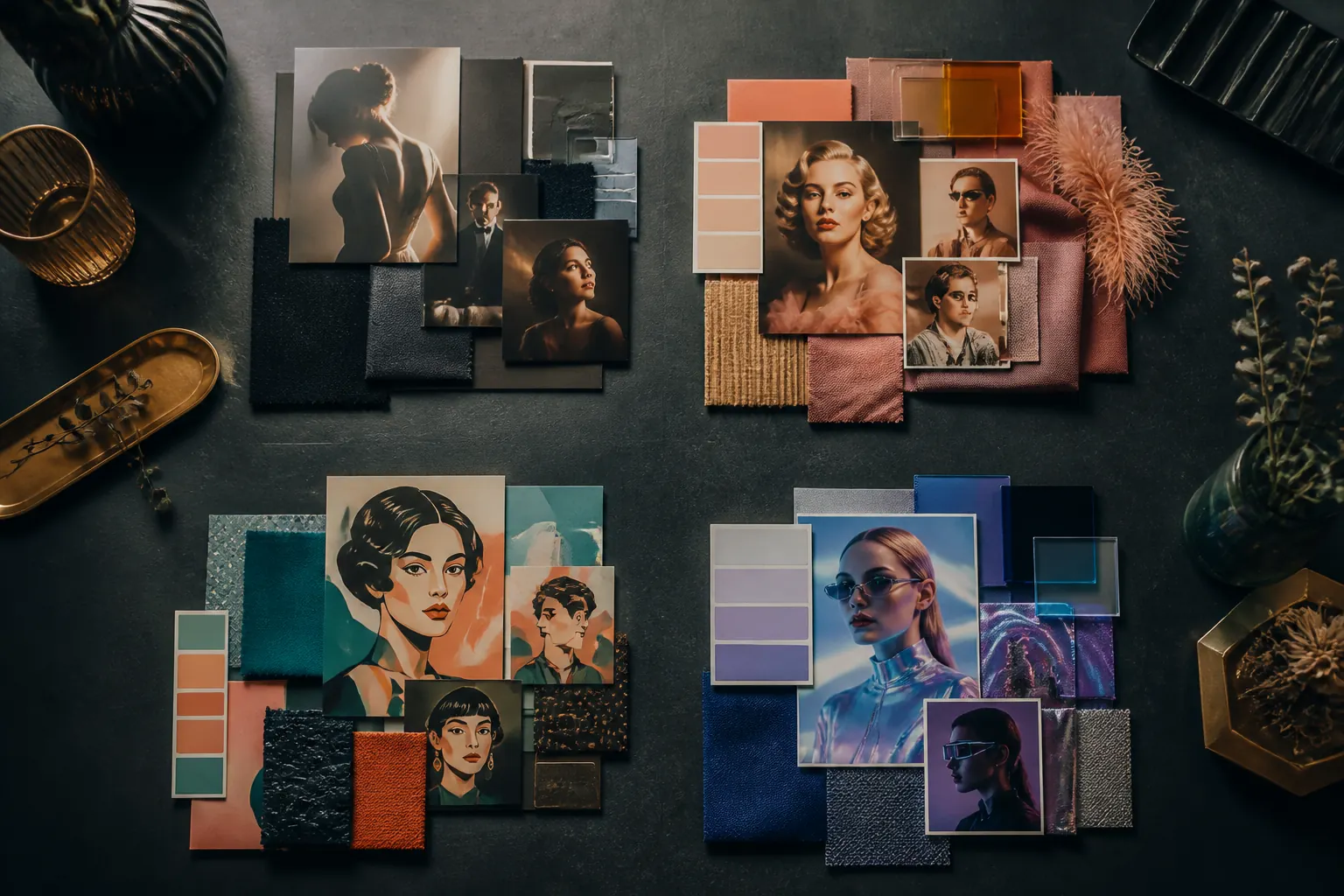
The most useful AI photo booth ideas are not lists of characters. They are visual systems. A theme family sets the lighting, palette, texture and mood, which makes it easier to produce varied portraits that still look connected.
| Theme family | Works well when | Approval focus |
|---|---|---|
| Cinematic portrait | The event needs polished drama rather than novelty | Lighting direction, wardrobe era and degree of realism |
| Graphic illustration | You want bold colour and a clearly designed look | Line style, texture, palette and facial likeness |
| Retro world | The decade or cultural reference is central to the event | Accurate styling cues without copying a specific film or character |
| Refined futuristic | A launch or corporate event needs a modern visual language | How subtle or transformational the result should feel |
| Event-specific concept | The experience must support a unique campaign or celebration | Brand boundaries, required elements and what must be avoided |
Selfie Cube offers preset themes as well as a custom option. The Selfie AI photo booth page explains the current experience and package details. For a custom route, begin with one family and refine it instead of combining every style that caught the planning team’s attention.
Make the theme recognisable in three seconds
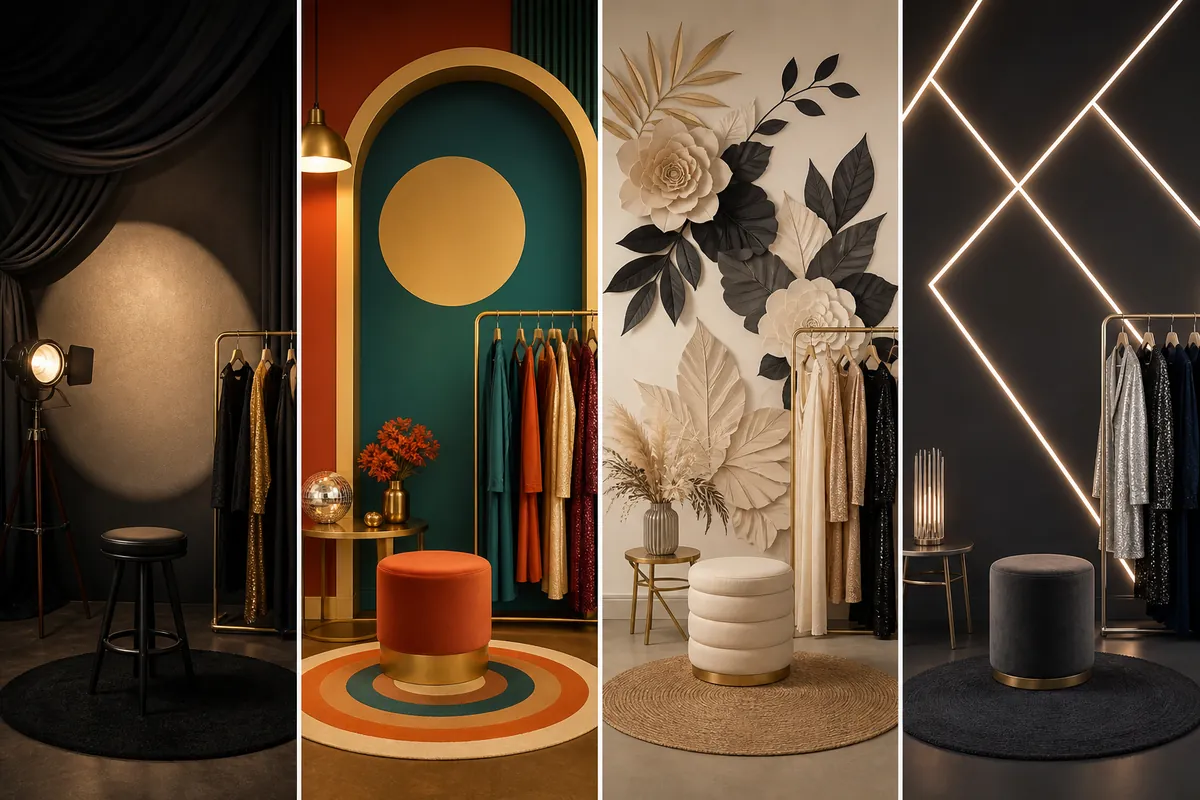
Recognition comes from a small number of repeated signals. Use two or three strong cues rather than a crowded collection of props and visual references.
Pick a dominant colour relationship
“Warm gold with deep green” is more actionable than “luxury”. “Cream, black and dusty rose” gives the output a clearer family resemblance than “elegant”. Keep secondary colours controlled so clothing and skin tones still have room to sit naturally in the image.
Choose one lighting language
Soft editorial light, hard cinematic shadow and neon edge lighting create very different results. Mixing them within the same theme can make the gallery feel unrelated, even when the wardrobe and background are similar.
Use a specific setting, not a vague mood
“1920s hotel portrait studio” gives clearer direction than “vintage glamour”. “Graphic botanical paper world” is more useful than “dreamy garden”. Specific settings help organisers discuss the idea without relying on subjective words.
Plan for real guests, not only the reference image
A reference image may look excellent because one model, outfit and pose suit it perfectly. An event theme has to work across a much wider group. Test whether the idea remains flattering and recognisable when the guest arrives in a dark suit, a bright dress, patterned clothing, glasses or formal traditional wear.
Decide how closely the transformed portrait should resemble the original person. Some concepts work best with a faithful face and a changed setting. Others allow stronger wardrobe or illustration changes. Record the boundary before the event so “creative” means the same thing to the organiser and the production team.
Groups need separate thought. A visual direction that works for one face may become cluttered with three or four people. If group portraits matter, include them in testing and keep the composition simple enough to preserve each person.
Wardrobe guidance should stay practical
If one clothing colour creates a poor result, tell guests or the organiser before the event. Avoid asking everyone to dress for the technology unless the dress code already supports the concept.
Keep exact branding in a fixed output frame
For corporate events and activations, separate the creative theme from the final brand layout. The portrait can carry the campaign mood through colour, setting and styling. The print or digital frame can then hold the logo, event name and date in a predictable position.
This usually feels more considered than forcing a large logo into the generated scene. It also makes approval easier because the brand elements can remain exact while the portrait varies. The broader AI photo booth approval guide covers responsibility, guest journey, privacy questions and event-day sign-off. Organisers handling guest images can also review the South African Information Regulator’s POPIA guidance.
Review test outputs at their real size
Do not approve only a full-screen concept. Review the result in the format guests will actually receive. A detailed background that looks impressive on a laptop may become visual noise on a photo strip. Small text, thin lines and several sponsor marks can disappear or compete with the portrait.
Ask for a compact test set that includes different faces, clothing colours and at least one group if groups will use the booth. Check the set as a gallery as well as one image at a time. The individual portraits should vary, but the collection should still look like one event.
| Check | Question to answer |
|---|---|
| Likeness | Can guests still recognise themselves comfortably? |
| Consistency | Do all tests belong to the same visual world? |
| Clothing | Does the treatment work with likely event attire? |
| Groups | Can more than one person remain clear and balanced? |
| Output | Does the design remain readable at the final print or sharing size? |
| Boundaries | Have unwanted objects, symbols, characters and treatments been listed? |
Give guests a simple choice
The event-day explanation should fit into one short sentence per option. “Choose cinematic, illustrated or futuristic” is clear. A menu of ten similar styles slows people down and makes it harder for the operator to keep the queue moving. Check the AI photo booth guest journey when deciding when guests choose their theme.
If the event includes several audiences, two or three well-separated options can be more inclusive than one narrow character concept. Keep the names plain, show a representative example and let the visual do most of the explaining.
A theme brief you can adapt
Example brief: “Create a cinematic hotel-lobby portrait with warm gold lighting and deep green details. Keep each guest recognisable and preserve formal clothing. Show one person clearly in the foreground, with an uncluttered setting behind them. Keep our exact logo and event date in the fixed print frame. Test glasses, dark suits, bright clothing and the small groups we expect at the function.”
Replace those choices with your own event requirements, then have one person approve the test set. Corporate teams can use the corporate approval checklist to record the version and sign-off deadline.
A practical AI theme briefing checklist
- State the main job of the experience.
- Finish the sentence: “Every guest should look as if they belong in…”
- Select one theme family and two or three recognisable cues.
- Confirm the dominant colour relationship and lighting style.
- Decide how closely faces and clothing should match the original portrait.
- List any objects, symbols, characters or treatments that must not appear.
- Separate exact brand elements from the variable portrait treatment.
- Confirm whether solo and group portraits must both work.
- Review a varied test set at the final output size.
- Name one person who can approve the theme and final tests.
If you are still comparing formats, start with the Selfie Cube booth comparison and decide whether the event needs a transformed portrait, a fixed background, a printed booth experience or a 360 video moment.
Common theme mistakes to avoid
- Too many references: several eras, art styles and colour systems compete instead of forming one idea.
- A theme built around one person: the reference does not translate to varied guests or groups.
- Unclear likeness expectations: the organiser wants a recognisable portrait while the reference suggests a dramatic character transformation.
- Late brand additions: logos and copy are added after the composition has already been approved.
- Approving at the wrong size: the concept is judged only on a large screen, not as a print or share image.
- Too many guest choices: the menu slows the queue and makes the gallery feel fragmented.
Frequently asked questions
How many AI photo booth themes should an event offer?
One strong theme is often enough. If guests need a choice, use two or three clearly different options that can be explained quickly and still belong to the same event.
Can an AI photo booth theme match a company brand?
Yes. Use the brand’s approved palette, mood and campaign idea to guide the portrait, then keep exact logos and required copy in the final layout where they can remain consistent.
Should guests choose their theme before taking a photo?
A small, clear choice can work well. Show one representative example for each option and avoid a long menu of similar looks.
What makes a custom AI theme different from a preset?
A preset uses an existing visual direction. A custom theme is briefed around the event or campaign and needs additional creative approval before production.
Continue planning
Explore the Selfie AI experience
Check the current AI service, package options and venue connection requirement.
Use the AI event approval guide
Set the theme, likeness, artwork and guest-information approvals before event day.
Compare AI with green screen
Compare creative portrait changes with background replacement.
Want help choosing a theme?
Tell us your event type, date and creative direction. We can recommend a practical route and prepare a personalised quote.